Our Short List of 3

- Best for: Restoring headphone and mic sockets on a desktop or older laptop with a spare USB-A port.
- USB-A stereo sound adapter with plug and play setup
- 3.5mm stereo headphone output and 3.5mm mono microphone input
- No drivers needed on Windows and Mac
- USB bus-powered with no external power supply

- Best for: USB-C-only laptops and tablets that need a headphone jack and a mic input without a converter dongle.
- USB-C to 3.5mm audio adapter with aluminum housing
- 24-bit/96kHz audio conversion for headphone playback
- Stereo headphone output and mono microphone input on separate jacks
- Plug and play on Windows, macOS, and Linux

- Best for: Desk setups where volume and mute need to be within reach without opening software settings.
- External stereo sound card with volume control knob
- Microphone mute button and sound switch button on the inline control
- USB to 3.5mm jack adapter for headphones, headsets, and microphones
- Compatible with Windows, Mac, Android, Chromebook, and Switch
All 5 Picks at a Glance
| Product | Specs | Action |
|---|---|---|
| SABRENT USB External Stereo Sound Card Adapter (AU-MMSA) |
| Check price on Amazon |
| SABRENT USB-C to 3.5mm Audio Adapter (AU-UCMA) |
| Check price on Amazon |
| VENTION USB Sound Card with Volume Control |
| Check price on Amazon |
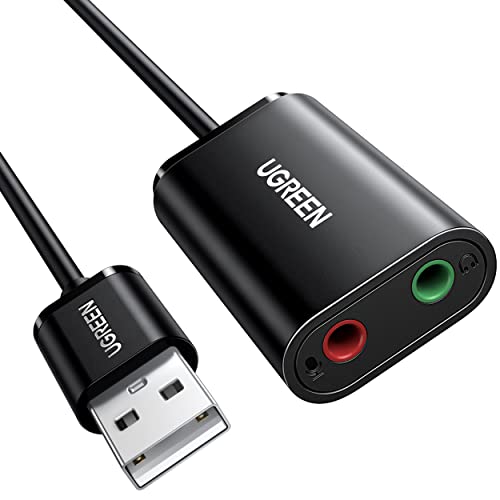 UGREEN USB Sound Card Adapter (30724) |
| Check price on Amazon |
 Cubilux 7.1 USB Surround Sound Card |
| Check price on Amazon |
Key takeaways
- Compare 5 cheap external sound cards for laptops and desktops, from basic USB adapters to USB-C and 7.1 surround models, and pick the right one.
A dead headphone jack forces a simple choice: replace the whole machine, open the case, or plug in a small adapter that takes over the audio job. For most people the adapter wins, because the fault is usually confined to one worn socket while everything else on the computer still works fine. The real decision is which kind of adapter matches the ports and headset you already own, since a USB-A dongle is useless on a laptop with only USB-C ports, and a single combo jack cannot serve a headset with two separate plugs.
This guide is for laptop owners with a broken or missing audio jack, desktop users who want a front-panel replacement without opening the case, and console players who need a mic input their dock does not provide. Every product below was chosen from the name and specifications shown on its Amazon product page, with the focus kept on the cheapest external sound cards that still cover the common connection layouts.
Quick Picks
As an Amazon Associate we earn from qualifying purchases
| Product | Best for | Key spec from title |
|---|---|---|
| SABRENT USB External Stereo Sound Card Adapter (AU-MMSA) | Replacing a dead headphone jack on a desktop | Stereo sound adapter, plug and play, no drivers needed |
| SABRENT USB-C to 3.5mm Audio Adapter (AU-UCMA) | Laptops and tablets with only USB-C ports | 24-bit/96kHz, stereo out and mono mic in |
| VENTION USB Sound Card with Volume Control | Adjusting volume without opening on-screen settings | External stereo sound card with volume control |
| UGREEN USB Sound Card Adapter (30724) | Older headsets with two separate 3.5mm plugs | Dual TRS 3.5mm headphone and microphone jacks |
| Cubilux 7.1 USB Surround Sound Card | Line-in recording and surround sound on a laptop | 48KHz-384KHz sample rate, full aluminum alloy |
How to Choose
Match the plug to the ports you actually have
Start by looking at the computer, not the adapter. A USB-A dongle fits desktops and older laptops, while a machine with only USB-C ports needs a USB-C adapter or a separate converter that adds bulk and another point of failure. Count the free ports too, because a dongle that blocks the neighbouring socket can be a problem on a thin laptop with two ports in total. Check the headset side as well: two separate plugs need two separate jacks, while a single four-pole plug needs a combo jack or a splitter. Buying the wrong plug shape is the most common reason a cheap adapter goes straight back in its box.
Decide whether you need a microphone input at all
Many buyers only need sound out, for headphones or a pair of powered speakers, and any stereo adapter will do that job. A microphone input matters as soon as calls, voice chat, or recording enter the picture, and here the details start to matter. Some adapters give the mic its own jack, which suits headsets with a separate mic plug, while others take the mic through a single combo jack. A few list a mono mic input only, which is fine for voice calls but not for a stereo line source. If the mic is the whole point of the purchase, confirm the jack layout before anything else.
Look at the sample rate and the jack layout together
Sample rate figures tell you the ceiling of the digital conversion, and the listings in this guide range from 16-bit/48kHz on the simplest adapters to 24-bit/96kHz and higher on the step-up models. For spoken calls and everyday listening the lower figure is enough, and the money is better spent on the right connector. Higher figures matter more for music listening and for recording a line-level source, where the extra headroom is audible on decent headphones. Pair the figure with the jack layout: a high sample rate is no help if the adapter has no line-in socket for the source you want to record.
Weigh build and controls against the job at hand
A bare dongle that lives permanently in a desktop USB port can be plain plastic, because nothing touches it once it is plugged in. The same adapter carried in a laptop bag benefits from an aluminum shell and a short cable that keeps strain off the port. Inline controls earn their place when the adapter sits on a desk: a volume knob and mute buttons let you silence a call or lower game audio without hunting through menus. A cabled adapter also keeps the body clear of neighbouring ports on crowded laptop edges. None of these extras change the sound, but they change how pleasant the adapter is to use.
The 5 Best Options
SABRENT USB External Stereo Sound Card Adapter (AU-MMSA)
- Best for: Restoring headphone and mic sockets on a desktop or older laptop with a spare USB-A port.
- USB-A stereo sound adapter with plug and play setup
- 3.5mm stereo headphone output and 3.5mm mono microphone input
- No drivers needed on Windows and Mac
- USB bus-powered with no external power supply
Restoring headphone and mic sockets on a desktop or older laptop with a spare USB-A port.
The two jacks are separate, so a headset with a single combo plug needs a splitter to use both the headphones and the microphone.
The AU-MMSA is the default fix for a dead jack on a desktop or an older laptop, because it does the smallest possible job. It plugs into a USB-A port, presents a green stereo headphone socket and a pink mono microphone socket, and needs no driver installation on Windows or Mac. With no cable to snag and no software to configure, it suits a machine that stays in one place and a user who wants the audio back with one plug-in. Its plain plastic body is the trade-off for the low cost, and it is best left plugged into a single USB port rather than carried around.
Watch out for: The two jacks are separate, so a headset with a single combo plug needs a splitter to use both the headphones and the microphone.
SABRENT USB-C to 3.5mm Audio Adapter (AU-UCMA)
- Best for: USB-C-only laptops and tablets that need a headphone jack and a mic input without a converter dongle.
- USB-C to 3.5mm audio adapter with aluminum housing
- 24-bit/96kHz audio conversion for headphone playback
- Stereo headphone output and mono microphone input on separate jacks
- Plug and play on Windows, macOS, and Linux
USB-C-only laptops and tablets that need a headphone jack and a mic input without a converter dongle.
Check the port first, because the USB-C plug will not fit a USB-A socket, and the mic input is mono rather than stereo.
The AU-UCMA answers the port problem that the USB-A models cannot, because it ends in a USB-C plug that goes straight into modern laptops, tablets, and phones without a converter. Its listing promises a 24-bit/96kHz upgrade over basic adapters, with a stereo headphone output and a separate mono microphone input in an aluminum housing. That combination makes it the natural pick for a thin laptop that dropped the headphone jack entirely, and for anyone who moves one adapter between a laptop and a tablet. Plug and play operation on Windows, macOS, and Linux keeps setup to a single connection.
Watch out for: Check the port first, because the USB-C plug will not fit a USB-A socket, and the mic input is mono rather than stereo.
VENTION USB Sound Card with Volume Control
- Best for: Desk setups where volume and mute need to be within reach without opening software settings.
- External stereo sound card with volume control knob
- Microphone mute button and sound switch button on the inline control
- USB to 3.5mm jack adapter for headphones, headsets, and microphones
- Compatible with Windows, Mac, Android, Chromebook, and Switch
Desk setups where volume and mute need to be within reach without opening software settings.
The listing gives no DAC chipset or sample rate figure, so buyers who need a stated conversion ceiling should pick a model that lists one.
The VENTION model stands out in this group for one reason: it puts the volume control on the adapter itself. A control knob plus microphone and sound switch buttons sit inline on the cable, so muting a call or turning the volume down takes a finger movement instead of a trip through on-screen menus. The listing describes a USB to 3.5mm stereo adapter that supports headphones, headsets, and microphones with a 3.5mm jack, and it lists compatibility with Windows, Mac, Android, Chromebook, and Switch. That wide platform list, combined with the physical controls, makes it a good desk-side adapter for a shared computer or a gaming setup.
Watch out for: The listing gives no DAC chipset or sample rate figure, so buyers who need a stated conversion ceiling should pick a model that lists one.
UGREEN USB Sound Card Adapter (30724)
- Best for: Legacy headsets with two separate plugs, used across Windows, Mac, Linux, and console machines.
- USB-A adapter with dual 3.5mm TRS jacks for headphone and microphone
- 16-bit/48kHz audio conversion with 90 dB signal-to-noise ratio
- 15 cm cable and ABS plastic housing
- Plug and play on Windows, Mac, Linux, PS4, PS5, Chromebook, and Raspberry Pi
Legacy headsets with two separate plugs, used across Windows, Mac, Linux, and console machines.
The microphone jack accepts mono TRS plugs only, does not support TS or TRRS plugs, and the adapter is not compatible with PS3.
The UGREEN 30724 is the adapter for the headset drawer full of older gear, because it is built around two separate 3.5mm TRS jacks: green for headphones and red for the microphone. Its listing states 16-bit/48kHz audio with a 90 dB signal-to-noise ratio, a 15 cm cable, and an ABS plastic housing, and it runs without drivers or external power. Compatibility covers Windows, Mac, Linux, PS4, PS5, Chromebook, Surface Pro 3, and Raspberry Pi, which makes it useful across a household with several machines. The cabled body keeps the adapter clear of neighbouring ports on a crowded laptop edge.
Watch out for: The microphone jack accepts mono TRS plugs only, does not support TS or TRRS plugs, and the adapter is not compatible with PS3.
Cubilux 7.1 USB Surround Sound Card
- Best for: Laptop and desktop users who want surround sound and a line-in socket for recording a line-level source.
- USB-A external sound card with 5.1 and 7.1 surround formats
- 48KHz-384KHz sample rate range for headphones
- Headphone playback up to 384 kHz at 24-bit
- Full aluminum alloy housing with line-in and stereo mic input
Laptop and desktop users who want surround sound and a line-in socket for recording a line-level source.
The surround formats are virtual rather than discrete multi-speaker outputs, so confirm how your playback software handles them before buying.
The Cubilux is the specialist of this group, aimed at buyers who want more than a bare headphone socket. Its title lists a 48KHz-384KHz sample rate range, a full aluminum alloy shell, a USB-A connection, and support for line-in and stereo mic input, with 5.1 and 7.1 surround formats. Headphone playback runs up to 384 kHz at 24-bit, which puts it ahead of the basic stereo adapters for music listening. The extra line-in socket is the feature that justifies the step up: it accepts a line-level source that the other adapters in this guide cannot take at all.
Watch out for: The surround formats are virtual rather than discrete multi-speaker outputs, so confirm how your playback software handles them before buying.
Which One Fits Your Situation
Your desktop headphone jack just died
Pick the SABRENT AU-MMSA. It plugs into a spare USB-A port, gives you a green headphone socket and a pink mic socket, and needs no drivers on Windows or Mac. The plain dongle can stay plugged in permanently, and there is nothing to configure or charge. Keep a note of the separate jacks, because a single-plug headset needs a splitter to use its microphone.
Your laptop has USB-C ports and nothing else
Pick the SABRENT AU-UCMA. Its native USB-C plug goes straight into the laptop without a converter, and the aluminum housing survives life in a bag better than a plastic dongle. The 24-bit/96kHz conversion and separate stereo-out and mono-mic jacks cover calls, music, and voice chat in one small adapter you can keep in a pocket.
You want volume and mute at your fingertips
Pick the VENTION USB Sound Card with Volume Control. The inline knob and the mic and sound buttons let you adjust levels and silence a call without touching the computer, which matters on a shared desk or during a game. Its broad compatibility across Windows, Mac, Android, Chromebook, and Switch means one adapter can move between machines.
You need line-in or surround sound on a budget
Pick the Cubilux 7.1 USB Surround Sound Card. The line-in socket takes a source the stereo-only adapters cannot accept, the 48KHz-384KHz range and 384 kHz headphone playback suit music listening, and the aluminum shell holds up to regular handling. The UGREEN 30724 is the fallback if your priority is a legacy two-plug headset rather than recording.
Common Mistakes
- Buying a USB-A adapter for a laptop that only has USB-C ports, then needing a converter to use it at all.
- Assuming a single combo jack will accept a headset with two separate plugs without a splitter.
- Choosing an adapter with no microphone input when the real job is voice calls or voice chat.
- Ignoring the mic plug type, since several cheap adapters accept mono TRS plugs only and reject TS or TRRS plugs.
- Paying for surround formats and a high sample rate when the actual use is spoken calls on basic earbuds.
Frequently Asked Questions
Do these external sound cards need drivers?
Most adapters here are plug and play, including both SABRENT models, the VENTION, and the UGREEN 30724, which list no driver installation on Windows and Mac. The computer recognises the adapter as a USB audio device as soon as it is plugged in. If no sound appears, check the sound output setting, because the computer may still be pointing at the old internal device.
Will a cheap USB sound card fix a broken headphone jack?
Yes, when the fault is confined to the socket itself. The adapter bypasses the internal audio path entirely and takes over both output and microphone input through USB. It will not help if the problem is a failed USB port, a muted system setting, or a headset with a damaged cable, so test the headset on another device first.
Can I use one of these adapters with a games console?
It depends on the adapter and the console. The UGREEN 30724 lists PS4 and PS5 compatibility, and the VENTION lists Switch compatibility, while the SABRENT models list Windows, Mac, and Linux. Check the listing for your exact console before buying, because console support varies between models and is not universal across the category.
What is the difference between a stereo adapter and a 7.1 sound card?
A stereo adapter gives you two channels, left and right, which covers headphones, calls, and music. A 7.1 model such as the Cubilux adds virtual surround processing and a line-in socket for recording. For everyday listening the stereo adapter is enough; the surround model suits buyers who want the extra input and wider sample rate range.