Our Short List of 3
All 3 Picks at a Glance
| Product | Specs | Action |
|---|---|---|
 1. TREE.NB C41-N550 Battery for ASUS N550 and Q550L Series | Check price on Amazon | |
 2. DGTECH C41-N550 Laptop Battery Replacement — 15V 59Wh | Check price on Amazon | |
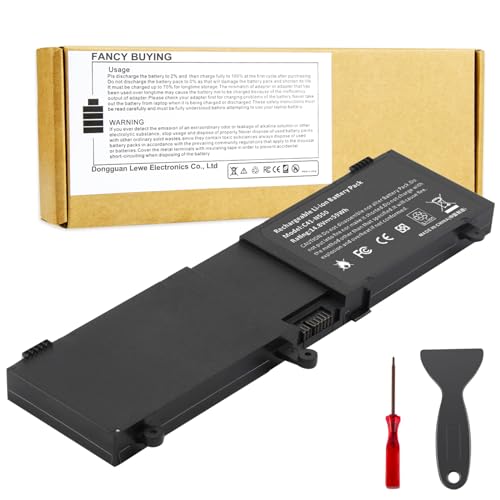 3. Fancy Buying CO. C41-N550 Laptop Battery for ASUS N550 and Q550L | Check price on Amazon |
Key takeaways
- Find the best replacement battery for ASUS Q550L with verified C41-N550 fit, 59Wh capacity, voltage checks, and safe installation guidance.
As an Amazon Associate we earn from qualifying purchases.
Affiliate Disclosure: This article contains affiliate links. If you buy through a link on this page, we may earn a commission at no extra cost to you.
Introduction
The ASUS Q550L was a well-built 15.6-inch convertible-era laptop with a touchscreen, a backlit keyboard, and an internal battery that was never meant to be swapped from the outside. After years of daily charging, that internal pack is the part most likely to fail first. Common signs include the laptop shutting down well before the gauge reaches empty, the battery swelling enough to lift the trackpad or separate the bottom panel, a charge percentage that jumps in large steps, or a machine that only works while plugged in.
Replacing the battery can give a Q550L several more years of useful life, but only if you buy the correct pack. The Q550L does not use a generic external laptop battery. It uses an internal lithium-polymer pack with the part number C41-N550, rated at 15V and 59Wh with a nominal capacity of 4000mAh. Every pick in this guide is a C41-N550 pack that lists the Q550L and Q550LF in its compatibility list. That narrow focus is deliberate. A battery that fits a different ASUS family, even one with a similar name, will have a different connector position, screw pattern, or voltage, and it will not work safely in this machine.
This guide explains how to confirm compatibility before you order, compares three C41-N550 options currently listed on Amazon US, and walks through the checks that matter most: part number, voltage, capacity in watt-hours, cell type, and the condition of the listing itself. It also covers what to do before you open the laptop, how to handle a swollen pack, and how to calibrate and care for the new battery once it is installed.
What to Check Before You Buy a Q550L Battery
Confirm the part number first
Open the Windows battery report or check the label on your original pack if you have already removed it. You are looking for C41-N550, also cross-referenced with the ASUS spare number 0B200-00390000. If your original battery carries a different part number, stop and re-check your exact model. The Q550L and Q550LF shipped with the C41-N550, and that is the number every replacement in this article is built around. Ordering by laptop name alone is the most common mistake with internal batteries, because ASUS reused similar model names across generations with different internal layouts.
Match voltage and watt-hours, not just milliamp-hours
The C41-N550 is a 15V pack rated at 59Wh and 4000mAh. Some listings describe the same pack as 14.8V, which is the nominal voltage of the same four-cell lithium configuration, while 15V is the rating ASUS prints for this part. What matters is that the replacement is sold specifically as a C41-N550 with a 59Wh rating. Watt-hours are the most reliable comparison across listings because they combine voltage and capacity. A pack advertised with a much higher milliamp-hour figure but no watt-hour rating, or a rating far from 59Wh, deserves extra skepticism for this model.
Understand thin, thick, and internal fit
Unlike older laptops with a latch-release battery bay, the Q550L battery sits inside the chassis under the bottom cover. The pack is a flat, wide lithium-polymer unit that screws into place and connects with a multi-pin cable. That means installation requires removing the bottom panel screws, carefully lifting the cover, disconnecting the old pack, and seating the new one in the same orientation. It is a manageable job with the right screwdriver and a plastic opening tool, but it is not a tool-free swap. If your original battery is swollen, do not pry against it with metal tools, and do not continue using the laptop until the pack is removed.
Check listing quality signals
For a discontinued laptop like the Q550L, original ASUS retail packs are scarce, and most buyers will choose a reputable third-party C41-N550. Look for a listing that states the exact part number, the full compatible model list including Q550L and Q550LF, the voltage and watt-hour rating, built-in protection against overcharge, over-discharge, overheating, and short circuit, and a clear warranty or return policy. Listings that hide the part number, reuse photos from a different battery shape, or promise unrealistic capacity for this chassis should be avoided.
The Best Replacement Batteries for ASUS Q550L
1. TREE.NB C41-N550 Battery for ASUS N550 and Q550L Series
The TREE.NB C41-N550 is the most straightforward recommendation for most Q550L owners because its listing is explicit about both the part number and the full compatibility list. It is a lithium-polymer replacement rated at 59Wh, with listings describing it as a 4000mAh pack for the ASUS N550 family and specifically naming the Q550L and Q550LF alongside the N550J, N550JA, N550JV, N550JK, and ROG G550 models that share this battery design.
That shared compatibility is a strength, not a weakness. ASUS used the C41-N550 across the N550, G550, and Q550L lines, so a pack engineered for that whole family is exactly what a Q550L needs. The TREE.NB listing gives the model number as C41-N550 and describes the pack as a brand-new replacement, which matters because a used or refurbished internal pack is a poor choice for a laptop you intend to keep using daily.
In practical terms, a healthy 59Wh pack should restore the kind of unplugged runtime the Q550L had when its original battery was fresh, subject to the age of the rest of the system, screen brightness, and workload. Expect the biggest improvement if your current pack has degraded to the point of early shutdowns. No third-party pack can make a decade-old laptop behave like a new machine, and this guide does not claim tested runtime figures. What the specifications support is a like-for-like restoration: same part number, same watt-hour rating, same internal form factor.
Choose the TREE.NB if you want the clearest match between listing, part number, and model list, and you prefer a lithium-polymer pack that mirrors the original design. Before ordering, compare the connector and screw positions in the listing photos with your original battery, and keep your order details in case you need to use the return window for a fit issue.
2. DGTECH C41-N550 Laptop Battery Replacement — 15V 59Wh
The DGTECH C41-N550 is a direct alternative built to the same headline specification: 15V, 59Wh, and the C41-N550 part number, with a compatibility list that covers the ASUS N550, N550JA, N550JV, N550J, N550X47JV, N550JK, G550, and G550JK series as well as the Q550L family. The listing describes the pack as brand new with lithium-ion cells and backs it with a 12-month warranty, which is a useful signal when comparing third-party internal batteries.
Warranty support matters more for internal packs than for many other accessories because you will only discover a capacity or fit problem after installation. A seller that states a warranty term clearly gives you a defined route if the pack arrives damaged, fails to be recognized by the laptop, or loses capacity abnormally in the first months. As with any replacement, keep the packaging until you have completed a few full charge cycles and confirmed that Windows reports the battery correctly and that the laptop charges to a full charge without excessive heat.
The DGTECH makes sense if the TREE.NB listing is unavailable or if you prefer this seller’s stated warranty and support terms. The underlying buying checks are identical: confirm C41-N550 on your original pack, confirm Q550L in the compatible models, and confirm the 59Wh rating before you check out. Do not substitute a DGTECH pack with a different part number simply because it carries the same brand name, since the brand sells batteries for many unrelated ASUS models.
For installation, the DGTECH follows the same internal procedure as any C41-N550. Power the laptop down completely, unplug the charger, remove the bottom panel, disconnect the battery cable before unscrewing the pack, and avoid pulling on the wires themselves. After fitting the new pack, reconnect the cable firmly, replace the cover without forcing it, and charge the battery fully before judging its runtime.
3. Fancy Buying CO. C41-N550 Laptop Battery for ASUS N550 and Q550L
The Fancy Buying CO. C41-N550 listing describes a 14.8V, 59Wh lithium-ion pack built as a four-cell replacement for the same ASUS family, naming the N550, N550J, N550JA, N550JV, N550JK, G550, G550J, G550JK, ROG G550 series, and the Q550L and Q550LF, including the Q550LF-BBI7T07 variant. The 14.8V figure is the nominal voltage description of this battery configuration, paired here with the same 59Wh capacity that defines the C41-N550, so it remains a specification match for the Q550L rather than a different battery class.
This option is useful as a third verified listing for the same part, which helps when one seller is out of stock. Stock for discontinued internal batteries can be inconsistent, and having multiple genuine C41-N550 listings to compare reduces the temptation to gamble on a vaguely described pack that merely claims universal ASUS compatibility. Universal compatibility claims are a red flag for internal batteries. A correct listing names the part number and the models, as this one does.
Buyers should still do the same photo comparison. Check that the pack shape in the listing matches the wide, flat original in your Q550L, that the cable exits on the correct side, and that the listed part number is C41-N550 and not a similar-looking code. If any of those details conflict with your original battery, choose one of the other picks in this guide instead of trying to adapt a pack that was not made for this chassis.
After installation, follow the seller’s first-use guidance in spirit: run the new battery through a few complete, gentle charge and discharge cycles during normal use so the laptop’s fuel gauge can learn the new pack. Avoid leaving the laptop at a full charge in a hot car or draining the new battery to absolute zero repeatedly, both of which shorten lithium battery life regardless of brand.
How the Three Picks Compare
All three batteries in this guide are the same type of product for the same job: an internal C41-N550 replacement rated at 59Wh for the ASUS Q550L and its N550 and G550 siblings. That is intentional. For an internal laptop battery, variety for its own sake is not helpful. The meaningful differences are listing clarity, seller support and warranty wording, cell description as lithium-polymer or lithium-ion in the listing, and current availability on Amazon US.
If you want the closest match to the original pack’s lithium-polymer description and the most detailed model list, start with the TREE.NB. If stated warranty terms are your priority, compare the DGTECH listing carefully. If the first two are unavailable, the Fancy Buying CO. pack gives you another C41-N550 listing with the Q550L named explicitly. In all three cases, the part number check matters more than the brand name on the label.
Do not buy a higher-capacity pack that does not list C41-N550, a pack for the Q550LF from a different battery family without confirming the part number, or an external power bank as a substitute for a failing internal battery. A power bank can extend runtime in an emergency, but it does not fix a swollen or dead internal pack, and a swollen pack must be removed regardless of how you power the laptop afterward.
Installation and Safety Notes
Start by backing up important files and shutting the laptop down fully rather than putting it to sleep. Work on a clean, static-free surface with good light. You will typically need a small Phillips or Torx driver that matches the bottom panel screws on your unit, a plastic pry tool, and a container to keep the screws organized, since ASUS used more than one screw length on this chassis.
Once the bottom cover is off, disconnect the battery cable from the motherboard before removing the battery screws. Lift the old pack out without bending it. If the pack is swollen, warped, or stuck with adhesive that resists gentle pressure, stop and take the laptop to a repair shop rather than forcing it. A damaged lithium pack should be treated as a hazard, kept away from heat and puncture risk, and recycled through a local battery recycling program rather than thrown in household trash.
Seat the new C41-N550 in the same orientation, secure it with its screws without overtightening, and reconnect the cable until it sits fully. Replace the bottom cover and confirm that it sits flat. A cover that bulges after installation can indicate a mis-seated pack or, in the case of the old battery, swelling that needs attention before reuse. Charge the new battery fully with the laptop’s normal charger, then use the machine on battery power and watch for normal percentage decline, stable charging behavior, and no unusual heat around the battery area.
Finally, run a Windows battery report after a few days of use and compare the reported full charge capacity with the design capacity. A new third-party pack should report close to its 59Wh class rating. A large shortfall, sudden drops, or failure to charge are reasons to contact the seller within the warranty and return period rather than living with a defective pack.
Frequently Asked Questions
Will a battery for the ASUS N550 fit my Q550L?
Yes, when it is the C41-N550. ASUS used this part across the N550, G550, and Q550L families. The safe way to buy is by part number first and model name second. If a listing names the N550 but does not list C41-N550 or the Q550L, do not assume it fits.
Is 14.8V the same as 15V for this laptop?
For the C41-N550, listings use both figures to describe the same four-cell pack: 14.8V as nominal voltage and 15V as the rated voltage printed for the part. The deciding factors are the C41-N550 part number and the 59Wh rating, not the choice between those two voltage descriptions alone.
Can I replace the Q550L battery myself?
Many owners can, because the job involves removing the bottom cover, disconnecting a cable, and swapping a screwed-in pack. It still requires care, the correct driver, and patience with a tight cover. If the battery is swollen, if screws are stripped, or if you are not comfortable working inside the laptop, a local repair shop is the safer choice.
How long should a new Q550L battery last per charge?
Runtime depends on the health of the rest of the system, the workload, screen brightness, and Windows power settings. A new 59Wh C41-N550 should restore runtime to the range the laptop delivered when its original 59Wh pack was healthy. This guide does not publish tested hour figures because those vary too much by individual machine and use.
What should I do with the old battery?
Recycle it through a local electronics or battery recycling program. Do not puncture, crush, or incinerate a lithium battery, and do not mail a swollen or damaged pack unless the recycling program specifically instructs you how to do so safely.
Conclusion
The best replacement battery for an ASUS Q550L is not the one with the boldest capacity claim. It is a genuine C41-N550 pack rated at 59Wh, sold with the Q550L named in its compatibility list, clear protection and warranty information, and a listing you can compare against your original battery. The TREE.NB, DGTECH, and Fancy Buying CO. options in this guide all meet that core definition, giving you three same-type choices to compare on availability and seller support. Confirm the part number on your own machine first, handle the internal swap carefully, and a Q550L with a dead battery can return to reliable everyday use without replacing the whole laptop.