Key takeaways
- Find the best projectors to watch TV at home, with bright pictures, built-in streaming apps, clear sound, and easy setup for movies and shows nightly.
If you are looking for the best projectors to watch TV, you are probably hoping to replace a flat panel with a much larger picture without giving up the easy habits that make a television simple to use. A good TV projector should turn on, open a familiar streaming app, and fill a wall with a clear image while you sit on the sofa. It should also work in a normal living room, not only in a dark room with blackout curtains and a dedicated screen.

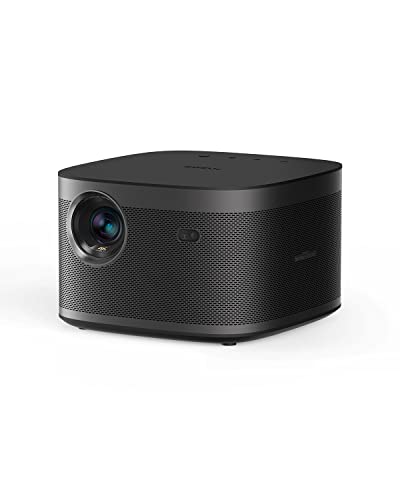
The quick answer is that the Epson Home Cinema 2350 is the most direct TV replacement in this guide because it combines strong brightness with built-in Android TV and a built-in speaker. The XGIMI Horizon Pro and the NEBULA Cosmos Laser 4K are strong choices if you want a compact 4K smart projector with automatic setup and good built-in sound. The BenQ HT2060 is a good cinema-first option if picture accuracy matters more to you than built-in streaming, although you will need a separate streaming stick or cable box for everyday TV use.
A projector is not automatically a better television. A television is brighter in a sunlit room and simpler to place. A projector wins on picture size and on the feeling of a cinema night at home, and you can move it from the living room to a bedroom or use a smaller image when you want one.
Before you choose, think about how you watch. Do you watch the news and a drama series with the lamps on, or do you mainly watch films after dark? Do you want to open Netflix, YouTube, or a live TV app from the projector remote, or are you happy to plug in a streaming stick? Do you have a light-colored wall, a pull-down screen, or a fixed screen? Do you need sound from the projector alone, or do you already have a soundbar?
Quick Picks
Our Short List of 3
All 4 Picks at a Glance
| Product | Specs | Action |
|---|---|---|
| Epson Home Cinema 2350 |
| Check price on Amazon |
| XGIMI Horizon Pro |
| Check price on Amazon |
 NEBULA Cosmos Laser 4K |
| Check price on Amazon |
 BenQ HT2060 |
| Check price on Amazon |
How to Choose
Brightness for a Living Room
Brightness is the first thing to get right for TV watching. A projector rated for a dark cinema room can look washed out when a lamp is on or daylight comes through a window. Look for a higher lumen figure if you watch with the lights on, and remember that manufacturers measure brightness in different ways, so compare figures from the same measurement standard where possible. Laser and LED projectors keep brightness more steadily and avoid lamp changes, while a lamp projector can be bright at a lower initial outlay but needs a replacement lamp after many hours of use.
For a living room, aim for the brightest model in your shortlist that still fits your room and your screen size. A larger image spreads the same light over a wider area, so a 120-inch image needs more brightness than an 80-inch image to look equally vivid.
Resolution and Picture Size
Resolution matters more as the image gets larger. A 4K projector keeps fine detail crisp on a 100-inch or larger image, and text in menus and sports graphics stays sharp. A Full HD projector can still look excellent on a smaller image or from a normal sofa distance, especially when its color and contrast are well tuned. The BenQ HT2060 in this guide is Full HD, and it earns its place because its color accuracy and cinema tuning suit film and drama, even though it does not show a native 4K image.
Think about your normal viewing distance as well. From a sofa ten feet away, a large Full HD image can look smooth and detailed. From closer in, or on a very large screen, 4K has a clearer advantage.
Built-In Streaming and Smart TV Apps
A projector that works as a TV replacement should make streaming simple. Built-in Android TV or Google TV gives you a home screen, a remote with voice search, and direct access to streaming apps, so you do not need to switch inputs or add another device. The Epson Home Cinema 2350, the XGIMI Horizon Pro, and the NEBULA Cosmos Laser 4K all include a smart TV system, which is why they suit everyday TV watching.
Check which apps you actually use before you buy. Some smart systems include Netflix, YouTube, Prime Video, Disney+, Hulu, and live TV apps, while others may need a workaround for one service. If your chosen projector has no smart system, as with the BenQ HT2060, plan for a streaming stick, a set-top box, or a cable box connected by HDMI.
Also check for a TV tuner if you want over-the-air channels without streaming. Most home projectors do not include a tuner, so live broadcast TV usually comes through an app, a cable box, or a separate tuner connected by HDMI.
Sound Without Extra Boxes
Built-in speakers decide whether a projector works on its own. A small speaker can be enough for a bedroom or a quiet evening, but a larger room and a large image call for fuller sound. The Epson model has a single 10 W speaker, which is clear for dialogue and casual viewing. The XGIMI Horizon Pro uses Harman Kardon speakers, and the NEBULA Cosmos Laser 4K uses dual tweeters plus dual speakers with Dolby Audio, which gives a fuller sound for films and sport.
If you already own a soundbar or an AV receiver, look for HDMI ARC or eARC, Bluetooth audio output, and an audio output jack. Those connections let you send sound to external speakers without a tangle of cables.
Throw Distance and Room Layout
Throw distance decides how far the projector must sit from the wall to fill your chosen screen size. A long-throw projector needs more room, while a short-throw model can sit closer. Check the throw ratio and the zoom range for each model, and measure your room before you order. A projector with optical zoom and lens shift is easier to place on a shelf or a table, because you can adjust the image size and position without moving the whole unit.
Keystone correction and autofocus also matter for TV use. Automatic keystone correction straightens the image when the projector sits off-center, and autofocus keeps the picture sharp without manual adjustment. The XGIMI and NEBULA models in this guide include automatic focus and keystone features, which help if you move the projector between rooms.
Screen, Wall, and Light Control
You do not always need a dedicated screen, but a screen improves contrast and color compared with a bare wall, especially in a bright room. A smooth, light-colored wall can work for casual viewing, while a textured or colored wall can dull the image and shift colors. A fixed screen gives the most consistent result, a pull-down screen saves wall space, and an ambient light rejecting screen helps in a room with lamps and windows.
Light control is just as important. Curtains, blinds, and lamp placement change how a projector looks more than any single specification. If you can dim the room for films and keep a lamp behind the seating area for news and casual shows, a mid-brightness projector can serve both uses.
Light Source, Noise, and Running Costs
The light source affects brightness, lifespan, and running costs. Laser projectors start quickly, hold brightness well, and last for many thousands of hours. LED projectors are also long-lived and compact, and they suit portable models. Lamp projectors can offer strong brightness and color at a lower starting point, but the lamp will dim over time and will eventually need replacement.
Fan noise is another everyday factor. A projector sits close to the sofa in many living rooms, so a loud fan can intrude on quiet dialogue. Look for a quiet operating mode and place the projector with clear airflow around its vents.
The Best Best Projectors to Watch TV Reviewed
Epson Home Cinema 2350
The Epson Home Cinema 2350 is the most complete TV replacement in this guide. It uses 4K PRO-UHD processing with a 3-chip 3LCD design, supports HDR10 and HLG, and is rated at 2,800 lumens for both color brightness and white brightness. That brightness helps it hold color and detail in a living room with lamps on. The built-in Android TV system means you can open streaming apps from the included remote, use voice search with Google Assistant, and watch live TV through a compatible app without adding a streaming stick.
Setup is flexible for a living room. Vertical lens shift and optical zoom help you place the projector on a shelf or a table and still align the image with the screen. Low latency mode suits gaming as well as sport, and the 10 W built-in speaker is clear enough for news, drama, and casual viewing. Bluetooth audio support lets you connect headphones or an external speaker when you want a fuller sound. The projector is larger and heavier than the portable models in this guide, so it suits a fixed spot in the living room rather than daily moves between rooms.
XGIMI Horizon Pro
The XGIMI Horizon Pro is a compact 4K smart projector built for easy home viewing. It offers 4K UHD resolution, 1500 ISO lumens of brightness, Android TV 10.0, and integrated Harman Kardon speakers. Automatic keystone correction, autofocus, and intelligent screen alignment help it adapt when you place it on a coffee table or a shelf, and it can project a large image without a permanent mount.
For TV watching, its strengths are simplicity and size. The smart system opens streaming apps directly, and the built-in speakers provide a fuller sound than a small single speaker. Its brightness is lower than the Epson model, so it looks its best in a dimmed room, especially on a large image.
NEBULA Cosmos Laser 4K
The NEBULA Cosmos Laser 4K by Anker is a laser-powered 4K projector with 2200 ANSI lumens, Android TV 10.0 through an included dongle, autofocus, auto keystone correction, and screen fit. Its laser light source gives a bright, sharp image, and it can project an image from 60 inches to 150 inches.
Sound is a clear strength here. Dual 5 W tweeters and dual 10 W speakers with Dolby Audio give a fuller sound than many compact projectors, so you can watch a film or a sports match without an external speaker. A carry handle makes it easy to move from the living room to a bedroom, and Intelligent Environment Adaptation helps the image fit the wall and avoid furniture or decorations in the frame. Note that the smart system runs through a dongle rather than a fully integrated platform, so keep the dongle connected and keep the firmware updated for smooth streaming.
BenQ HT2060
The BenQ HT2060 is a cinema-first projector, and it earns its place here for viewers who care most about picture accuracy. It offers native Full HD 1080p resolution, HDR10 and HLG support, 2300 lumens of brightness, and a 4LED light source with a long lifespan. Its color coverage is tuned for film, with wide color gamut support and accurate Rec.709 color, and it includes vertical lens shift, 1.3x zoom, and 2D keystone correction for flexible placement.
Partial-fit flag: the BenQ HT2060 has no built-in smart TV system, so it is not a direct TV replacement on its own. You will need a streaming stick, a set-top box, or a cable box connected by HDMI. It also shows a Full HD image rather than a native 4K image, although it accepts a 4K signal.
What to Check Before You Buy
Measure your room first. Note the distance from the projector position to the wall or screen, the ceiling height, and the largest image that fits without blocking a door, a window, or a light. Check the throw distance for your chosen screen size on the maker listing, and leave space for ventilation and cables.
Check your connections next. Count the HDMI ports you need for a streaming stick, a cable box, a games console, and a soundbar. Look for HDMI ARC or eARC if you plan to use external audio, and check for USB power if your streaming stick needs it. Wi-Fi and Bluetooth are useful for streaming and for wireless audio, but a wired Ethernet connection can give a steadier stream for live TV and sport.
Think about the screen and the sound together. A projector with a good built-in speaker can work alone in a small room, but a larger room benefits from a soundbar or a pair of speakers. A fixed or pull-down screen improves contrast, while a plain wall is a useful starting point if you want to try the size before you commit. Keep the projector lens clean, keep the air vents clear, and place the unit where the fan noise will not sit right beside your ear.
Finally, check the return and warranty terms on the listing before you buy, and confirm that the model and the included accessories match the listing. Projectors vary in what they include, such as a remote, a power cable, a dongle, or a streaming remote, so read the included items list.
FAQ
Can a projector really replace a TV for everyday watching?
Yes, for many households, if you choose a bright model with built-in streaming and sound. A projector works best when you can control the light for films and use a brighter setting or a smaller image for daytime news and shows. If you watch mainly in a bright, sunlit room and you never dim the lights, a television may still suit you better.
How bright should a projector be for watching TV with the lights on?
There is no single figure that fits every room, because screen size, wall color, and lamp position all change the result. As a guide, a brighter projector holds color and contrast better with lamps on, and a smaller image looks brighter than a large image from the same projector. The Epson model in this guide is rated at 2,800 lumens, while the NEBULA model is rated at 2200 ANSI lumens, and both are better suited to lit rooms than a dimmer portable model.
Do I need a screen, or can I use a wall?
You can use a smooth, light-colored wall for casual viewing, and many people start that way. A screen gives a more even surface, better contrast, and more accurate color, especially in a bright room. A fixed screen is the most consistent choice, a pull-down screen saves space, and a light-rejecting screen helps when you cannot dim the room.
Can I watch live TV and sport on a projector?
Yes, through a live TV streaming app, a cable box, or a set-top box connected by HDMI. Most home projectors do not include a broadcast tuner, so live channels usually come from an app or an external box. Check that your projector or your streaming stick includes the live TV app you use, and check that your Wi-Fi or wired connection is steady enough for live sport.
Do projectors have built-in speakers and smart apps?
Some do, and some do not. The three smart models in this guide include Android TV or a smart system with streaming apps and built-in speakers, so they can work on their own. The BenQ HT2060 has built-in speakers but no smart TV system, so it needs an external streaming device. If you want a simple TV replacement, choose a smart projector with speakers you find clear enough, and add a soundbar later if you want fuller sound.
Bottom Line
The best projector to watch TV is the one that fits your room, your light, and your viewing habits, not simply the one with the highest resolution on the list. For most living rooms, the Epson Home Cinema 2350 is the safest pick because it is bright, smart, and easy to use as a daily television. The XGIMI Horizon Pro suits a neat, compact setup for evening viewing, the NEBULA Cosmos Laser 4K suits a bright laser picture with strong built-in sound and portability, and the BenQ HT2060 suits viewers who prize picture accuracy and already own a streaming device.
Measure the room, check the throw distance, decide whether you need built-in streaming, and choose the model that matches how you actually watch.
Disclosure: As an Amazon Associate, we may earn from qualifying purchases.